Because guessing is expensive.The dirt track app for your laps, your setups and your crew chief.
Record laps with the phone in your car, see where they were won and lost, and ask Pocket Crew Chief what to change before the feature. Built by a racer. Free to download.
Official technology partner of Clauson-Marshall Racing
Same car. Same night. Two laps a quarter second apart.
Lap 6 ran 19.269. Lap 5 ran 19.507. Lap 5 gave up two tenths on the way into the first end, got all of it back through the middle, and was more than a tenth up on the back straight. It was still ahead with about 220 feet to go, and crossed the line 0.24 s behind.
Where each lap is at the time on the slider
0.00 s
Lap 6
Lap 5
Speed
43 mph
43 mph
Doing
On the gas
On the gas
Gap
Lap 5 0.24 s behind at the line
6
5
Lap 5 behindLap 5 ahead
On the gas
Coasting
Slowing
Real laps off a GoPro in the car. Drag the slider or the stripes. The colors come from GPS speed, so they show what the car did, not where your feet were.How the colors are worked out
Speeding up or slowing down by 0.15 g or more, held for three samples, shows as on the gas or slowing; anything in between is coasting, so steady throttle at a steady speed shows as coasting. There's no throttle or brake sensor. GPS puts a car's line within a few meters, so small differences in where two laps ran on the map are a hint, not a measurement.
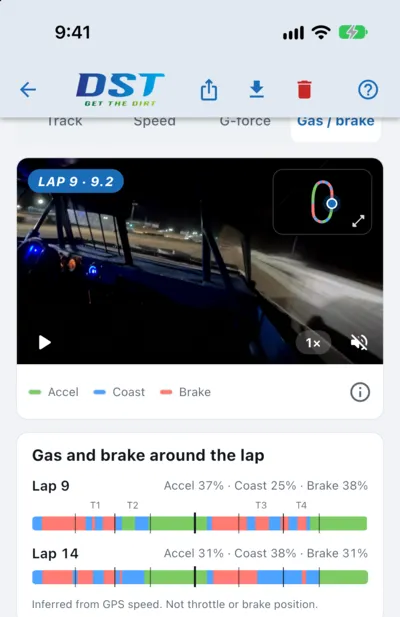
The same view in the app, from another night at I-35 (laps 9 and 14), with the in-car video in step. Set your corner lines once and it times every turn.
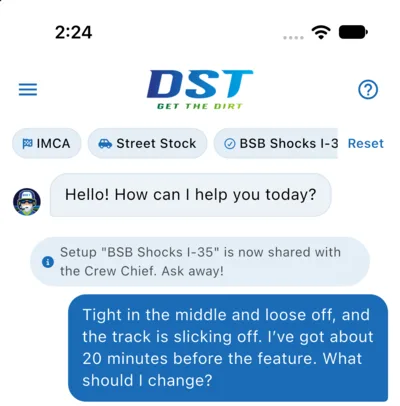
Tight in the middle. Loose off. Twenty minutes to the feature.
Tell Pocket Crew Chief what the car did, the way you'd tell your crew, and share the setup you ran. It picks up your sanctioning body, class and rulebook year.
It reads your saved setup sheet, so the answer starts from your numbers.
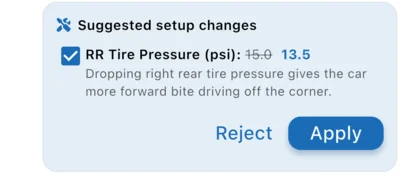
Changes come back as old and new values. Untick what you don't want.
Nothing on your sheet changes until you tap Apply.
Pocket Crew Chief is part of Pro. It works from what you tell it and your setup sheet, not from your laps. It's a second opinion when there's no time to call one, not a replacement for knowing your car.
A real question, and the change card that came back: right rear 15.0 to 13.5 psi, only if you tap Apply.
Both are in the app. Mount your phone in the car, or use the RaceBox or GoPro you already run.
Your phone is enough to start.
With just your phone
Mount it in the car and record your laps
Any two laps lined up: on the gas, coasting and slowing, and where you gained and lost, turn by turn once you set your corner lines
Setup sheets for your class, with photos, and a race log of every night
Parts, with the laps run on each one; checklists; rules and body measurements
Pocket Crew Chief (Pro)
Already run a RaceBox or a GoPro?
A RaceBox connects over Bluetooth and logs every lap
A GoPro with GPS: copy the laps straight off the camera, no card reader
GoPro in-car video plays in step with the laps
Free to download. Pro adds unlimited setups, RaceBox runs and GoPro imports, and Pocket Crew Chief. Both Pro plans start with a 7-day free trial.
Setups and race history. Remember what worked.
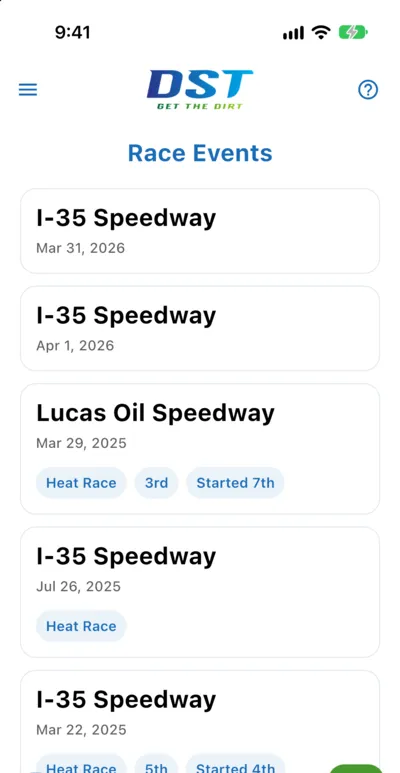
Two weeks later, same track, and nobody remembers what the left rear was. Keep a setup sheet for every car and every night, a race log with the weather, the track, the tires and where you finished, and a count of the laps on every part. Pull it up in the pits before you touch a wrench.
Built in the pits, by a racer.
“You can work all week, tow for hours, unload, and still feel like you're guessing. … You make changes fast, in the heat, with half a crew and limited time… then you're trying to remember what you did two heats later, or two weeks later at the same track.”
Dirt Slingin Tech is built by a software engineer who races. The app gets better the same way the car does: by listening to racers and paying attention to what happens at the track.